Shape it on the way.
Midi Stone sits between your controllers and everything that listens. Link any input to any output, then decide what each message becomes: passed on, reshaped, or stopped at the door.
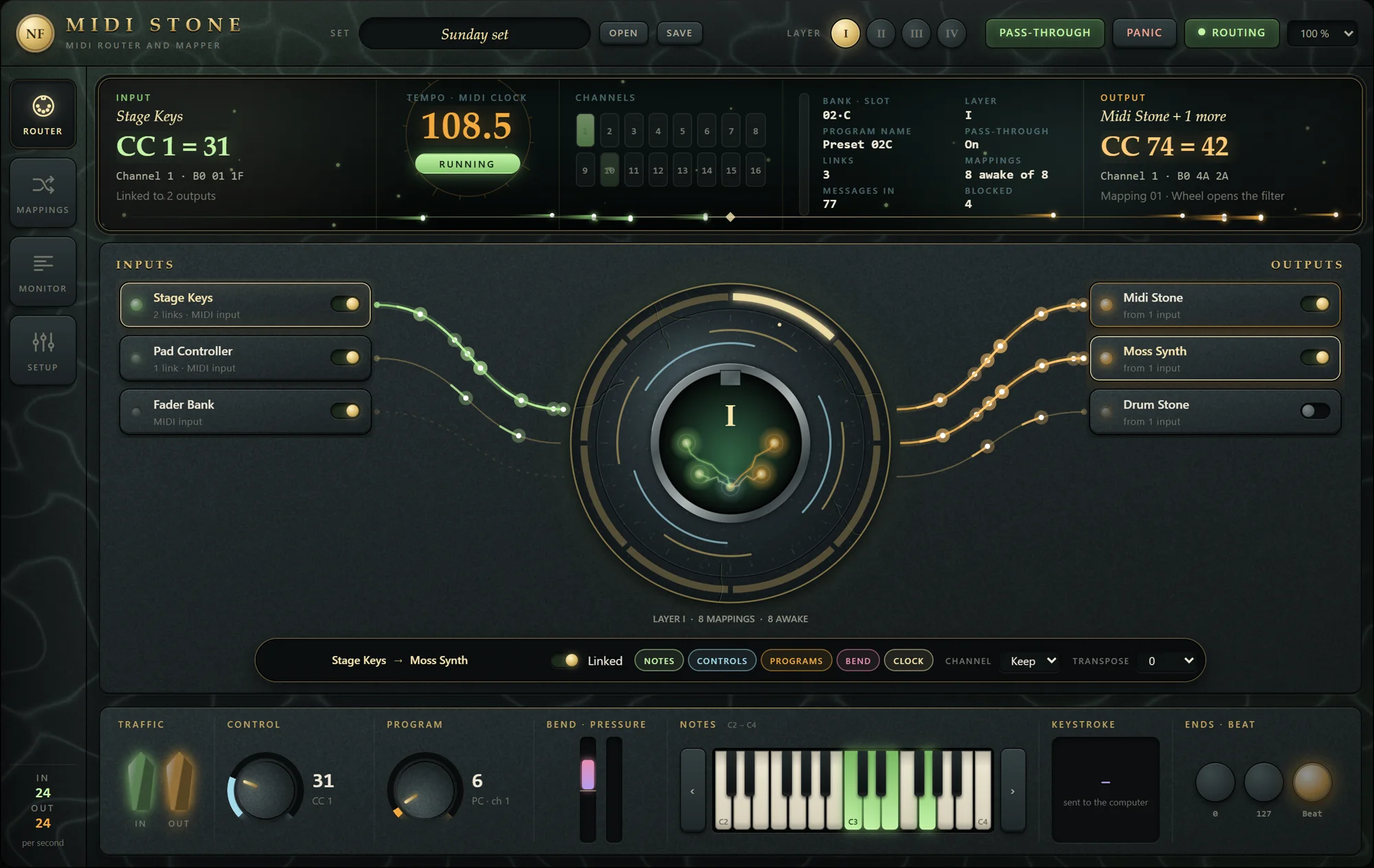
Draw the cable you wish you had.
Inputs on the left, outputs on the right, the stone in the middle. Link them, and choose what may pass on each link.
- Any controller or program in, any device or port out
- For each link: which messages pass, a new channel, a transpose
- Its own port, made by Windows 11: no extra virtual cable, no driver
- A controller that stops answering is set aside, and everything else keeps playing
Turn one message into another.
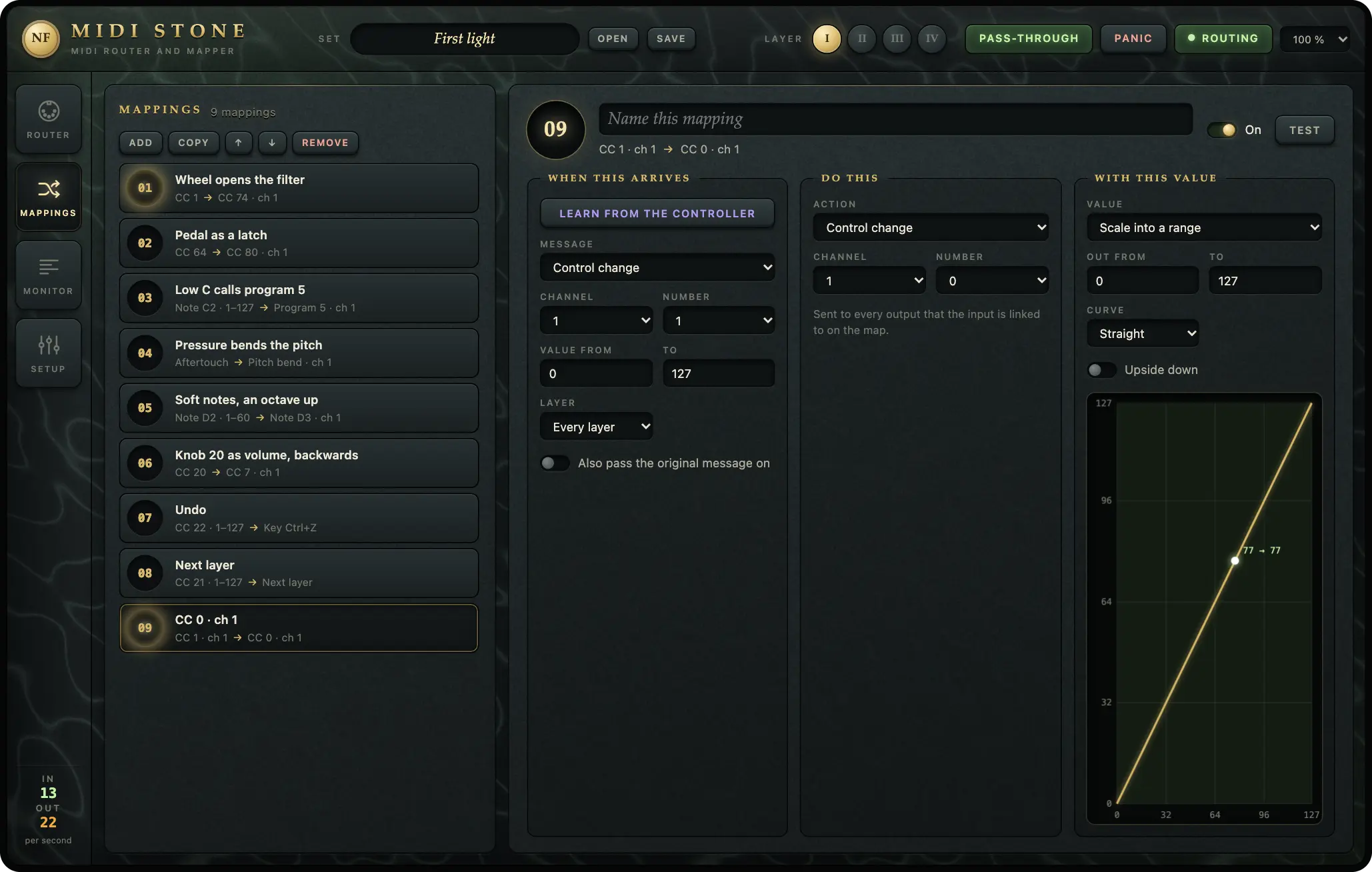
When this arrives, do that, with this value. Learn the control straight from your controller.
- Scale a control into a range, flip it, curve it, or fix its value
- A pedal becomes a latch; a note calls a program change
- A control can press a key on the computer: undo, record, next scene
- Name every mapping so you know what it does next month
Everything between the cable ends.
Four layers
Switch layers from a button on your controller, and the same knobs do something else.
Filters at the door
Stop clock, active sensing or SysEx before any mapping sees it, or block exact bytes.
A monitor that explains
Every message in and out, what it means, and which ones were stopped.
Keystrokes
Let a pad or button press a key on the computer, for the programs that have no MIDI learn.
A feedback guard
A port caught in a loop is shut, and opens again once it is quiet.
Sets and banks
Save the whole setup as a set, and name your banks so program changes show their name.
Link, shape, play.
Link
Switch on the devices you use and link each input to the outputs it should reach.
Shape
Add mappings and filters for what should change on the way. Learn controls by moving them.
Play
In your DAW pick the Midi Stone port. Everything you routed arrives there, shaped.
When one cable isn't enough.
Live sets
One keyboard plays two synths, split and layered, with a panic button close by.
Controllers that do more
Four layers turn eight knobs into thirty-two.
Services and shows
A foot pedal changes the program on the keyboard and the scene on the computer.
The studio
Old gear on new channels, without touching the gear.
What it needs.
- Runs on
- Windows 11, 64-bit · macOS 11 Big Sur or later (Apple Silicon and Intel)
- Ports
- Its own MIDI port, made by Windows: no driver. On a Mac, Core MIDI ports: no driver
- Routing
- Any input to any output, per-link message choice, channel and transpose
- Mappings
- Scale, flip, curve, fix, toggle, program change, keystroke
- Layers
- Four
- Price
- $29, pay once · 3 computers · free updates
- On a Mac
- On a Mac, install it with NF Audios Center: sign in with your NF ID and choose Get.
Midi Stone, answered.
How much is it?
$29, paid once, for up to three computers, with free updates. Install it from NF Audios Center and it runs as a 14-day trial; sign in to the Center with the account you bought with and it activates by itself.
Do I need Midi Gate for it?
No. Midi Stone makes its own port. Add Midi Gate, which is free, when you want more ports between your programs.
Is it a plug-in?
No. Midi Stone is a program that runs beside your music software, so it can sit between every device and every program at once.
Does it work on a Mac?
Yes, macOS 11 or later. On a Mac it is installed through NF Audios Center.
Be the first to shape it.
$29, pay once, for three computers. Need more ports between your programs? Midi Gate is free.