
Guide
How to De-Ess Vocals (Without Making Them Lisp)
How to de-ess vocals: find sibilance at 5-10 kHz, set threshold, attack and release, and tame harsh S sounds without dulling the voice or making it lisp.
To de-ess vocals, find the frequency where the S and T sounds sting (usually somewhere between 5 and 10 kHz), then use a de-esser or a band-limited compressor that turns that range down only when a sibilant hits. Aim for 3 to 6 dB of reduction on the loudest S sounds, and listen in context so the singer still sounds like they have all their teeth.
That is the short version. The rest of this guide explains why sibilance happens, how to find it quickly, and how to remove it without the lisping, dull sound that over-de-essing leaves behind.
What causes harsh sibilance
S, T, SH, CH and Z sounds are made by air rushing through a narrow gap between the tongue and teeth. That produces a burst of noisy, high-frequency energy that can be several decibels louder than the vowels around it, even though our ears accept it as normal in a room.
Recording and mixing make it worse in a few predictable ways:
- Bright microphones. Many condenser microphones have a presence peak between 5 and 10 kHz, right where sibilance lives.
- Close placement. Singing straight into the capsule from a few centimetres puts the air jet directly on the diaphragm.
- Compression. A compressor reacts mostly to the louder, lower vowel energy. It turns the vowels down and leaves the short S bursts relatively louder.
- Top-end EQ. A high shelf for air lifts the S sounds along with everything else.
How to hear and find the problem
Sibilance problems are easy to miss on laptop speakers and easy to overdo on bright headphones, so check on two systems if you can. Listen for S sounds that jump out of the mix, feel sharp, or make you want to turn the track down.
To find the exact frequency:
- Loop a phrase with a few obvious S sounds.
- Put a narrow EQ bell on the vocal, boost it by about 10 dB and sweep it slowly between 4 and 12 kHz.
- Stop where the S sounds get painfully loud. That is your centre frequency. Lower voices often land around 5 to 7 kHz, higher and female voices around 7 to 10 kHz.
- Remove the boost. You only used it to search.
A spectrum analyser helps too: sibilants show up as short, bright bursts in the upper range that are much hotter than the surrounding syllables.
Step by step: de-essing with any tools
You can do this with almost any stock de-esser, or with a multiband or dynamic EQ if your DAW does not have one.
- Fix the worst cases by hand first. If two or three S sounds are far louder than the rest, use clip gain to pull them down 3 to 6 dB. This keeps the de-esser from having to work hard on everything else.
- Place the de-esser. A common order is EQ to clean up, then compressor, then de-esser, so it catches the sibilance the compressor has exaggerated. Some engineers use a second, gentle de-esser after any bright EQ or saturation as well.
- Set the frequency. Use the centre you found by sweeping. If your de-esser offers split band (only the high band is reduced) versus wideband (the whole signal is turned down), start with split band; it is usually more transparent.
- Lower the threshold until the gain reduction meter moves on the S sounds and stays still on vowels. Aim for 3 to 6 dB on the loudest sibilants.
- Check the timing. De-essers need a fast attack, around 0.5 to 2 ms, to catch the front of the S, and a short release, roughly 20 to 80 ms, so they let go before the next vowel.
- Listen in the mix. Solo is useful for setup, but the right amount is decided with the music playing. Sibilance that sounds sharp alone can be just right against cymbals.
- Bypass and compare at matched level. The vocal should sound smoother, not darker.
If you do not have a de-esser, a dynamic EQ band set to the sibilance frequency with a moderate Q, a fast attack and a few decibels of maximum cut does the same job.
Where an NF Audios plug-in makes it faster
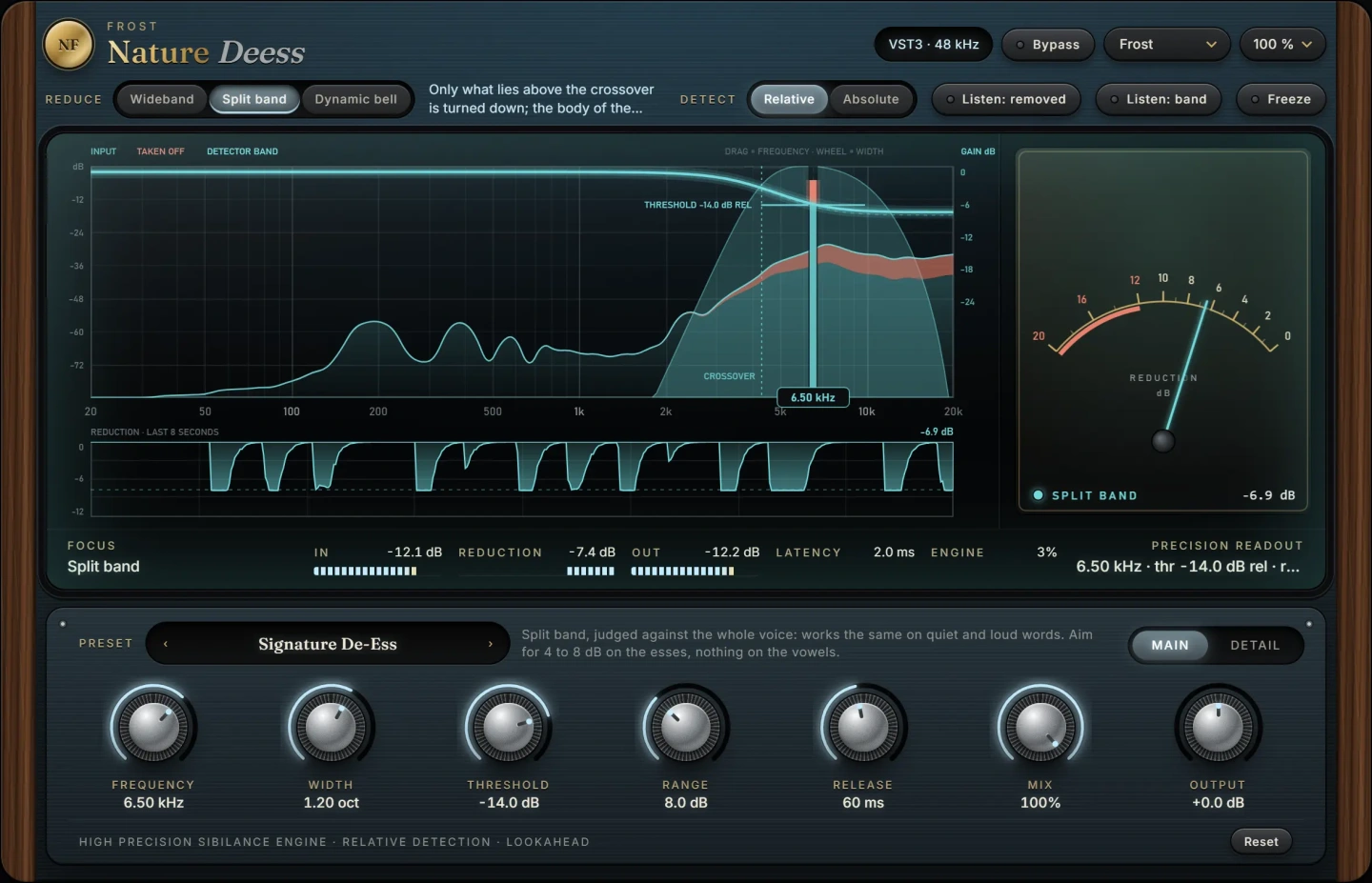
The fiddly part of de-essing is that a fixed threshold behaves differently on quiet and loud lines: set it for the chorus and it ignores the verses, set it for the verses and it chews up the chorus. Nature Deess is built around this problem. It takes the sting out of S and T sounds and leaves the rest of the voice alone, and it can judge sibilance against the level of the whole signal, so it works the same on quiet and loud lines. That means less riding of the threshold and fewer automation passes.
If you want one tool for the whole vocal chain, Lantern works from a single wheel that tightens the low end, clears the low mids, levels gently, adds warmth, presence and air, and de-esses at the bright end. It is a quick way to get a voice forward and controlled in one move, and it pairs well with a dedicated de-esser when a singer is especially sibilant. For the wider tone side of things, see how to make vocals sound warm.
Both run as VST3 plug-ins on macOS and Windows.
Common mistakes
- Too much reduction. More than about 8 dB on every S often turns them into TH sounds. The singer starts to lisp and the words lose clarity.
- The wrong frequency. Setting the de-esser too low, around 3 to 4 kHz, dulls the presence of the whole voice instead of the sibilants.
- De-essing in solo only. The mix masks a lot of high end. Judge the final amount with everything playing.
- Fixing it with a static EQ cut. A permanent cut at 7 kHz removes sibilance and air at the same time, so the vocal sounds dull between the S sounds too.
- Ignoring the source. If you are still recording, angling the microphone slightly off axis, or using a pencil or pop filter in front of the capsule, prevents much of the problem.
- Forgetting reverb and delay sends. Sibilance is often loudest in the effects. Send the de-essed signal, or put a de-esser on the reverb return.
Questions
What frequency should I de-ess vocals at?
Most sibilance sits between 5 and 10 kHz. Male and lower voices tend to sit around 5 to 7 kHz, female and higher voices around 7 to 10 kHz. Sweep with a boosted EQ band to find the exact spot for each singer, because it varies with the voice and the microphone.
Should the de-esser go before or after compression?
Usually after, because compression tends to make sibilance more obvious. If a vocal is extremely sibilant, a light de-esser before the compressor and another after it often sounds more natural than one working hard.
How much de-essing is too much?
If S sounds start to sound like TH, or words become harder to understand, you have gone too far. For most vocals, 3 to 6 dB of reduction on the loudest sibilants is plenty.
Can I de-ess with an EQ?
A dynamic EQ works well, because it only cuts when the band gets loud. A static EQ cut is a poor substitute: it removes the air and clarity from the whole vocal, not just from the S sounds.
The plug-ins in this guide
 New
New
More guides
- How to Compress Vocals: Ratio, Attack and ReleaseHow to compress vocals: ratio, attack and release settings that work, serial compression for an even vocal, levelling vs character and…
- How to EQ Vocals: A Step-by-Step GuideHow to EQ vocals step by step: high-pass the rumble, cut mud and nasal honk, then add presence and air. Frequencies, Q settings and common…
- How to Make Vocals Sound Warm and PresentHow to make vocals sound warm and present: clear mud, add body around 200 Hz, tame harsh upper mids, saturate lightly and compress for a…